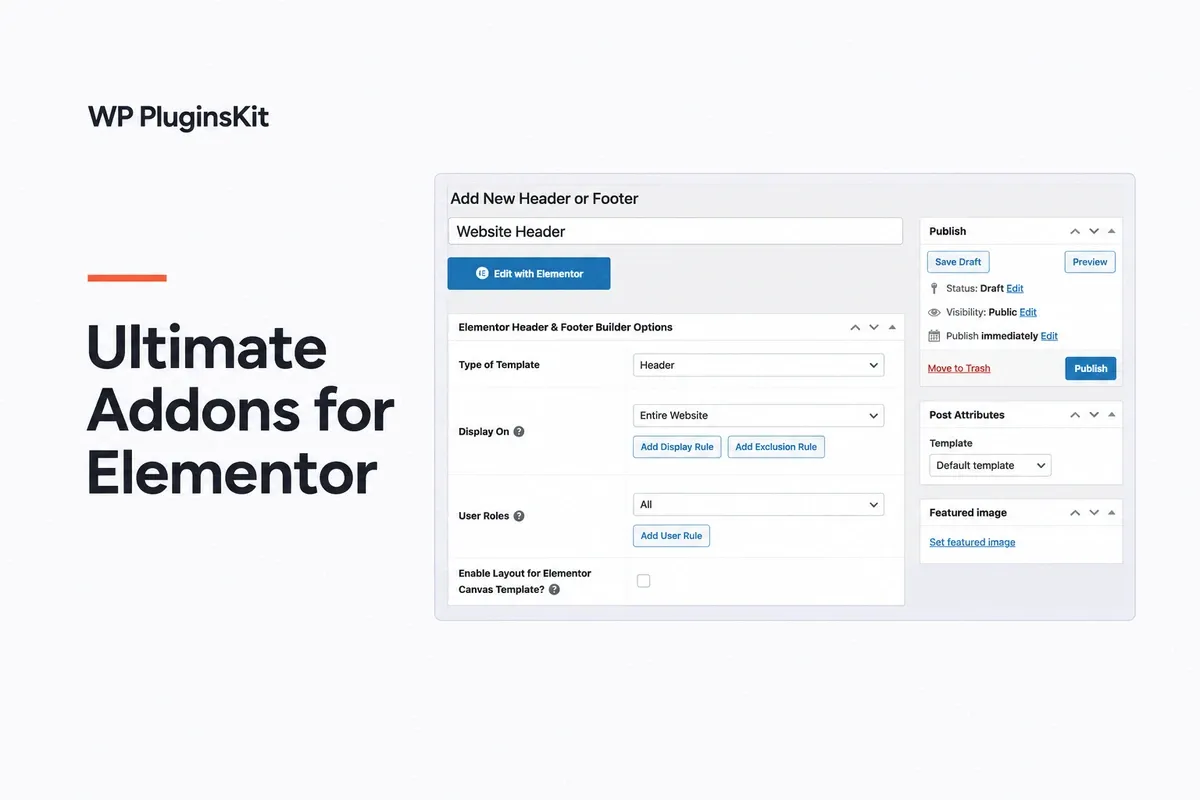
Ultimate Addons for Elementor lets you build a header or footer with Elementor Free and choose where it appears. You don't need Elementor Pro for that job. I'd start with the free plugin when your theme's header controls can't produce the layout you need, then check the design on protected staging before replacing a working site header.
Choose the free builder before buying an addon
The official plugin uses the slug header-footer-elementor and is developed by Brainstorm Force. It was previously called Elementor Header & Footer Builder. The new name covers more widgets, but the free header and footer builder remains part of the plugin.
Elementor must be installed and active. Either Elementor Free or Pro works. UAE Free and UAE Pro are separate, independent plugins: keep both only when your designs use features from both. Buying UAE Pro isn't a prerequisite for creating a free header, and buying it doesn't replace the Elementor editor.
| Your task | Where to start |
|---|---|
| Build a header, footer, before-footer section or reusable custom block | UAE Free, with an active Elementor installation |
| Choose where a header appears and which user roles see it | The free template's Display On and User Roles settings |
| Use premium widgets, form stylers or Cross-Site Copy Paste | Check the specific feature in UAE Pro before purchasing |
| Apply the premium Display Conditions feature to widgets or content | UAE Pro; this is separate from free header/footer template rules |
The current UAE Pro plans offer annual and lifetime options. Introductory annual prices renew at the full price, and annual support and updates run for one year. Choose a plan around a feature you need rather than a temporary bundle gift or a widget count.
Keep an existing header if it already works. For example, the Astra setup page covers a theme with its own header controls. Adding another builder for the same result gives you another layout system to maintain. If Elementor Pro already manages your header, decide which system will own that site part before enabling a UAE replacement.
Prepare a safe replacement
Take a restorable backup of the site's files and database before changing a shared header or footer. The UpdraftPlus setup page explains a backup route. Record the current theme header settings and any Elementor Pro header assignments so you can restore the previous layout.
I recommend a protected staging copy for the first design. The vendor's getting-started route publishes a template before editing it, which is suitable for a test copy but could expose a blank replacement on a live site. Keep a live replacement as a draft while designing it, and check its saved display rules before publishing. Publish only the finished layout in a controlled change window.
Define the intended scope first: the entire website, a particular page or an excluded section. Decide whether visitors and signed-in users should see the same header. These choices determine what to check after activation; a good editor preview alone doesn't prove that the right visitors receive the right template.
Install UAE and create a template
Open Plugins → Add New Plugin, search for Ultimate Addons for Elementor and match the Brainstorm Force listing. Choose Install Now, then Activate. The 2.9.8 listing requires WordPress 5.0 or later and PHP 7.4 or later. Those are plugin minimums; your active Elementor version and other site components can require newer versions.
- Go to UAE → Header & Footer Builder → Add New.
- Give the template a recognizable name, then select Header, Footer, Before Footer or Custom Block under Type of Template.
- Set the display location and user roles for that template. Save the settings before moving into the editor.
- Select Edit with Elementor and build the section. Keep the live replacement as a draft until its content and rules are ready.
- Save the design, return to its template settings and verify the type, locations, exclusions and user roles again before publishing.

The UAE getting-started instructions describe the builder path and template types. A Custom Block can be inserted with its shortcode; a Before Footer template adds a section above the footer. Neither requires importing a complete starter website.
Control where the layout appears
In the template settings, Display On → Entire Website is a broad assignment. Use it when the finished header should appear across the site, and add exclusions where a different layout is intentional. Check User Roles too: a layout restricted to a signed-in role won't give you the same result for an anonymous visitor.

Elementor Canvas deliberately removes the normal page header and footer. UAE provides a separate Enable Layout for Elementor Canvas Template? checkbox for templates you want to display there. Leave an intentional landing page free of navigation, or enable the UAE layout when that page should have it. Changing every Canvas page to another layout can undo an intentional design.
Use one deliberate header assignment for each location. If an old theme header or Elementor Pro template still appears alongside the new one, review those assignments and UAE's theme compatibility settings before adding CSS to hide the duplicate.
Build a menu that works on mobile
For a basic header, add the logo and a navigation widget, then choose the menu visitors should use. The free UAE Navigation Menu widget selects a WordPress menu from Content → Menu. Its dropdown lists menus created through Appearance → Menus. If you need a new menu, select Create a new menu, name it and choose Create Menu. Add the required pages with Add to Menu, select Save Menu, then return to the widget and select that menu.
The WordPress menu-screen instructions distinguish classic menus from block-theme navigation. A block theme can manage navigation in the Site Editor without exposing Appearance → Menus. Keep that existing header if it solves the task; don't switch themes or buy a widget merely to make this menu screen appear.
For Horizontal and Vertical layouts, check Content → Responsive → Breakpoint to choose when navigation becomes a mobile toggle. Expanded and Flyout layouts already use a toggle, so that breakpoint setting doesn't apply to them. Pick the behavior around your menu's actual width, then inspect it at narrower sizes rather than relying only on device icons in the editor.
After publishing the finished template, open representative pages while logged out. Check a page that should include the header and one that should exclude it. On a phone, open and close the menu, follow its links and check that long labels fit. Use the keyboard on desktop to reach the menu and its submenus, and confirm that focus remains visible. Repeat for the footer if you replaced it.
Fix the symptom you can see
| Symptom | Check first | Next action |
|---|---|---|
| A UAE widget is missing from the editor | Elementor and UAE are active; the widget is enabled | Enable it in UAE → Widgets / Features and save. Check Elementor → Element Manager too. |
| The layout exists in the editor but doesn't appear on the site | Template publish status, display locations, exclusions and user roles | Correct the rule for the affected page and visitor, then check while logged out. |
| The header is missing only on a Canvas page | The page layout and UAE's Canvas checkbox | Enable the template on Canvas only if that page should include it. |
| The header is visible on desktop but missing on mobile | Responsive visibility on its container and widgets | Remove an unintended visibility restriction, save and check the actual narrow layout. |
| Old styling remains after saving | Elementor's generated files and the site's cache layers | Use Elementor → Editor → Tools → Clear Files & Data, clear relevant site/CDN caches and check again. |
The missing-widget guide checks both UAE's widget controls and Elementor's Element Manager. For a theme integration problem, the plugin's directory FAQ provides UAE → Settings → Theme Support to select a compatibility method. Try a method on staging and inspect the affected pages before carrying the change to the live site.
An editor stuck on its loading screen is a different problem from a published header failing to appear. I'd record the affected template, active versions and exact symptom before following the vendor's editor-loading troubleshooting route. A memory change, permalink refresh or plugin rollback shouldn't be the first response to a simple display-rule mismatch.
Keep the layout maintainable
Enable the widgets your designs use and leave unnecessary ones off under UAE → Widgets / Features. Check existing pages before disabling a widget that may already be used. A modular control gives you a way to manage features; it doesn't establish a fixed speed gain for every site.
In WPMarmite's older paid-UAE test, a site with 13 active plugins loaded in 1.88 seconds without UAE and 1.91 seconds with UAE, almost all widgets enabled and a page template. Both screenshots show 525.2 KB and 23 requests. The reviewer took one measurement per condition and didn't identify an exact plugin version. Those figures describe that setup; they don't establish the impact of today's free header builder on your layout.
Keep a copy of the previous assignments until the replacement passes its visitor checks. If the new header breaks navigation, return its template to draft and restore the previous header configuration, then clear relevant caches and verify the public-facing pages. Don't delete both designs while diagnosing the problem.
Setup guide
- Back up the site, record the current header assignments and prepare a protected staging copy.
- Activate Elementor and the official free Ultimate Addons for Elementor plugin by Brainstorm Force.
- Open UAE → Header & Footer Builder → Add New. Choose the template type, display location and user roles, then save.
- Design the section with Edit with Elementor. Choose the correct navigation menu and check its responsive behavior. Keep a live replacement as a draft until finished.
- Review locations, exclusions and Canvas behavior. Publish the completed template with the old header assignments recorded for reversal.
- Check included and excluded pages while logged out, then test menu links, mobile navigation and keyboard access before extending the design.
Choose your next step
Use UAE Free for a header or footer that needs Elementor's visual layout controls. Buy Pro when a specific premium feature earns its place in the design. For another site function, choose from the WordPress plugin catalog around that task, and avoid adding a second widget suite to solve an already covered need.